An ELD review that only looks at the RODS pdf and stops at the grid leaves evidence unexamined: the standardized CSV contains required data that neither the PDF nor the roadside display is required to show.
Canada published its ELD amendments in 2019, but it wasn’t until April 2026 that CVSA published specific guidance addressing false RODS and ELD tampering. We still need clear, practical direction on how the data should be reviewed and used to support enforcement.
There are two common ways enforcement reviews a driver’s records of duty status (RODS): roadside or during a carrier review or facility audit. In the olden days, the driver handed over a paper logbook. The officer checked the story against supporting records and asked questions. ELDs give us vehicle data to check that story. They do not do the investigation for us.
How that data is collected, transmitted and preserved matters when it is used to write tickets or assess penalties. So does protecting the personal information it contains. The Technical Standard references here are to version 1.2 because that is what current devices are programed to.
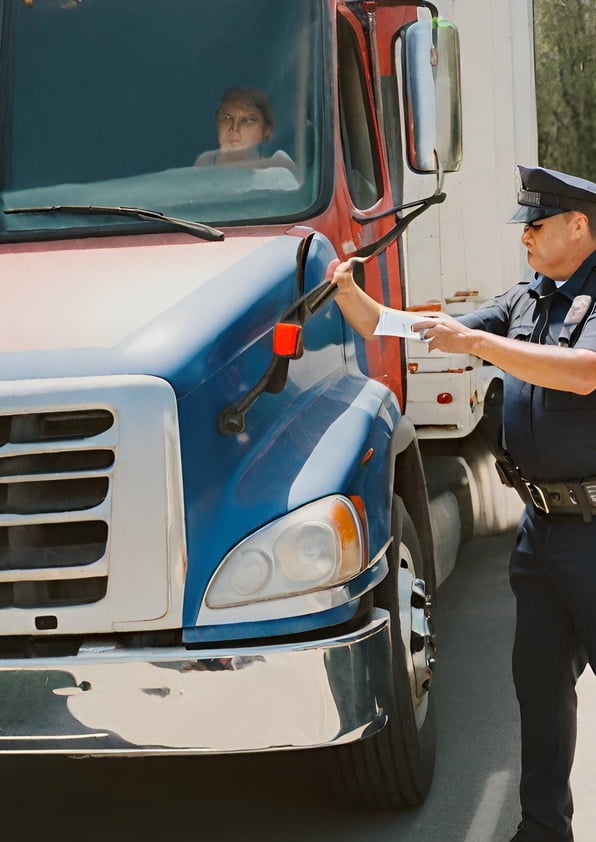
Roadside stop
The driver is stopped and asked to produce RODS. Under section 98(2) of the federal Commercial Vehicle Drivers Hours of Service Regulations, SOR/2005-313, electronic records can be produced on the display or as a printout. Many devices have a roadside inspection mode so the driver can hand the device to the inspector.
If the inspector requests the RODS to print or save, the driver must send the RODS using a supported method specified in the Technical Standard. Version 1.2 requires email capability. The prescribed email transfer uses encryption and Canadian PKI infrastructure.
If an officer writes a ticket based on those RODS, preserving what was reviewed is an important part of supporting the charge. If you get a ticket and the officer did not preserve the RODS that supported it, call me! That is an evidence question worth asking.
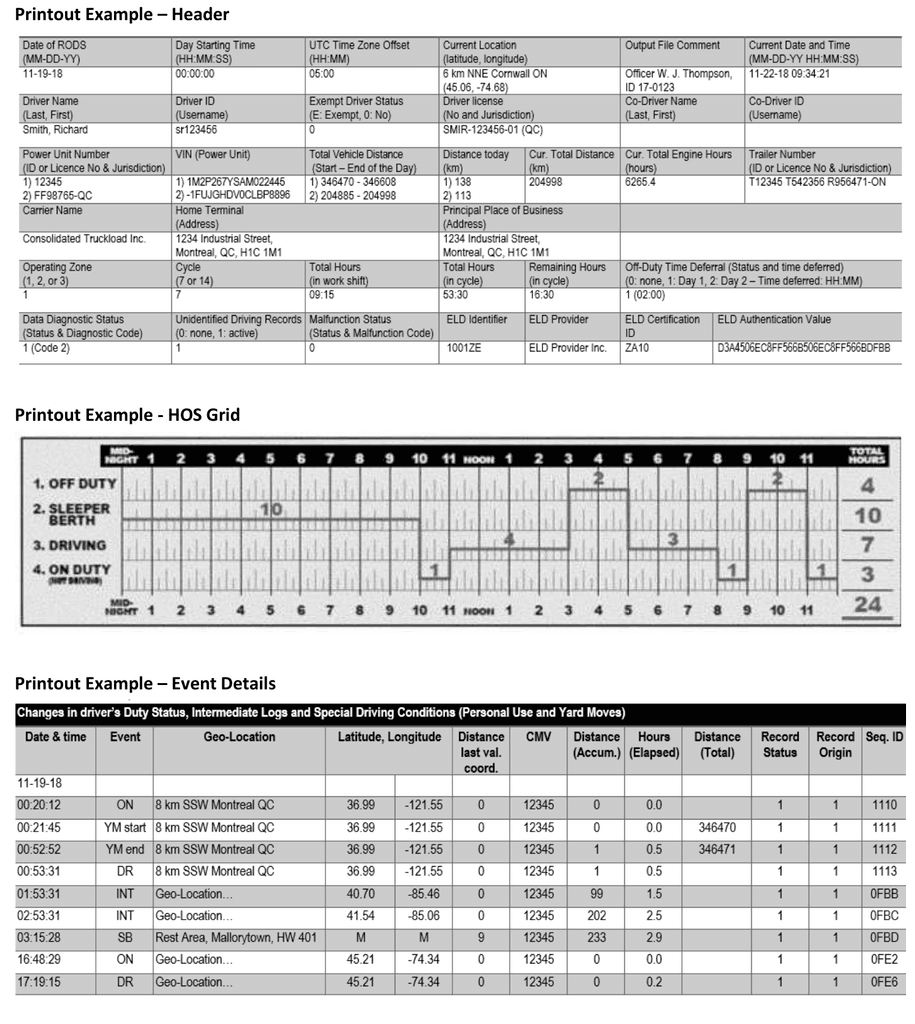
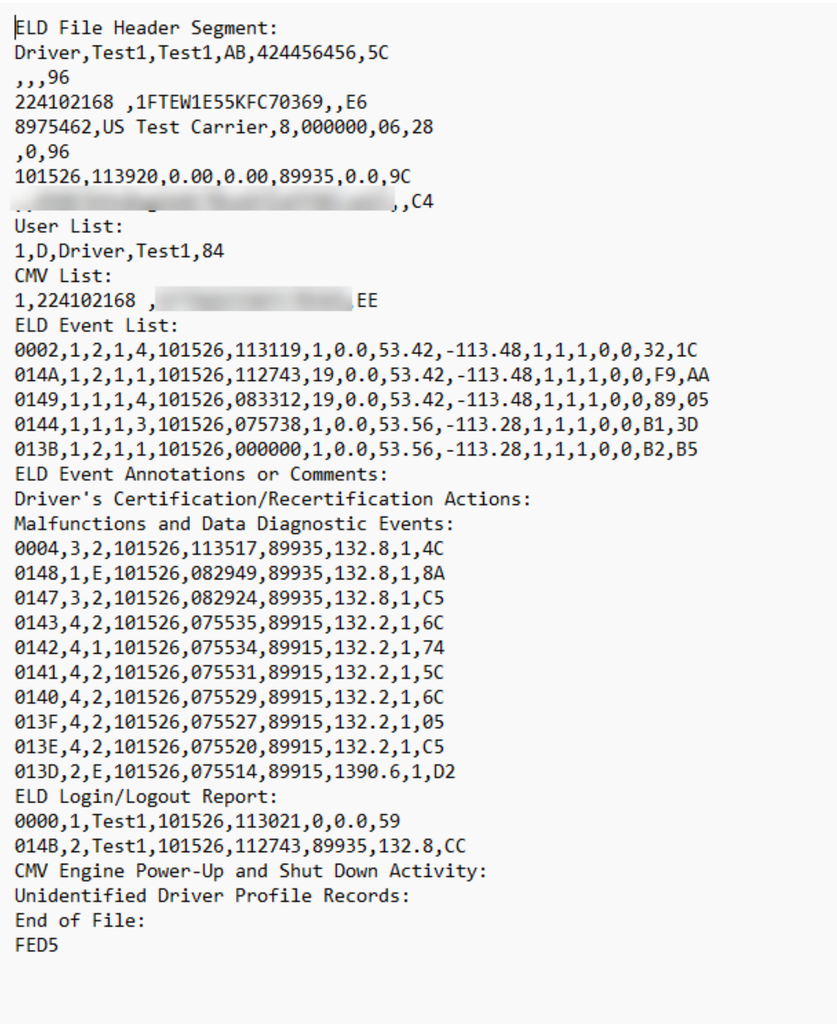
The email sent to the inspector will have a PDF and a CSV attached. The PDF looks like logbooks of the ancient ones: header, graph grid, duty-status totals and detailed events. The CSV contains all the same data in separate sections, with the newest events first. Open it in a text editor like WordPad or import it into Excel but keep the original unchanged. (Hint: file, save as, drop down menu, select Excel Workbook)
These two files are not the same!! The PDF can show an obvious hours-of-service violation. The CSV gives you additional information to investigate whether the records tell the whole story.
Technical Standard 1.2 example: header, HOS grid and event details.
Separate sample illustrating the CSV structure, including the User List and event sections. This is not the same record as the preceding printout.
Ready for the catch?
When producing RODS, the driver may be able to select a “simplified display.” Under 4.8.1.3(e), that simplified display view can omit five fields.
That, my friends, matters.
Here is what you may not be seeing on the PDF RODS:
| Field | Why it matters |
| Event Sequence ID Number | Link events to annotations and examine their sequence for gaps or separate numbering patterns that may indicate an additional ELD device. |
| Event Record Origin | Distinguish automatically recorded events, driver entries/edits, and edits requested by another user. |
| Event Latitude and Longitude | Compare recorded coordinates with the claimed location and trip to examine location and movement. |
| Distance Since Last Valid Coordinates | Identify distance travelled since a valid position was obtained, helping assess location-data gaps. |
One of the most useful parts of the CSV is the User List (4.8.2.1.2). It includes drivers and co-drivers with driving-time records on the most recent CMV driven by the inspected driver. It also includes support personnel who requested edits and the unidentified-driver profile.
That is a direct association. These are driver accounts connected to driving records on that truck, or support users connected to edit requests. If nine driver accounts appear in a 15-day output, who are those nine people? Relief drivers? A shared truck? Or do we need to call Ghostbusters?
You will not get that same structured User List from one driver’s PDF.
| Information | Full display / PDF requirement | What the CSV adds | Why it matters |
| Data check values | Not listed as required display/PDF fields | Event check values in specified segments, line check values, and a file check value | Supports checks for data inconsistencies or changes |
| User list | Driver/co-driver details and specified information about edit originators | A structured list including qualifying drivers/co-drivers and support personnel who requested edits, with account types and reference numbers | The User List establishes a direct connection: each listed driver has driving-time records on the most recent CMV driven by the inspected driver, and each listed support user has requested an edit within the reporting period. |
| Duty-status and intermediate events | Accumulated distance and elapsed engine hours, among other fields | Total vehicle distance, record-originator reference, and malfunction/diagnostic indicators on each applicable event row | Supports comparison of vehicle activity, event origins, and device conditions. |
| Certification events | Certification event date/time and specified identifying fields | Explicit date of the RODS being certified and certification event code | Helps establish which day was certified and examine recertification. |
| Engine power-up/shutdown events | Includes time, total distance, total engine hours, location, and unit number | VIN and trailer numbers on each event row | Helps associate engine activity with the vehicle and trailer configuration. |
| Malfunctions and diagnostics | The printout is limited to the 10 most recent malfunctions and 10 most recent diagnostic events | The CSV segment requires all malfunctions in the period and diagnostic records relevant to the inspected driver | Supports examination of a longer pattern that the printout may truncate. |
During a carrier review or facility audit, reviewers may obtain a sample of RODS through the carrier’s dashboard. But what exactly did they download? A graph? A PDF? The standardized CSV with all its required fields? We can all learn how to use a PDF editor. A report labelled “RODS” does not answer that question.
PKI protects the email transfer. Lack of PKI access does not, by itself, prove a third-party audit is invalid or an export is incomplete. The question is, did the inspector obtain enough information to support the findings? What data was used to conduct the hours of service review?
RODS location needs the same scrutiny. The ELD gets GPS coordinates and uses a built-in database to describe where the truck is, such as “5 km west of Calgary.” The GPS coordinates give a more precise position history. Comparing the RODS to GPS records supports the trip. RODS do not replace GPS!
An ELD can record the data, how much an inspector can verify depends on which records they receive and what they’re trained to look for. A clean graph grid does not answer who drove the truck or whether driving was recorded under a ghost account.
If enforcement is going to use these RODS to write tickets, assess penalties and judge carrier safety, inspectors need to be trained to look behind the graph.
The CSV is already part of the required output.
Requesting it is the first step. Knowing what to do with it is what makes the difference.